Fix your Microsoft 365 and Google Workspace security settings without locking anyone out.
Guardlie checks your tenant against CIS and vendor recommendations and explains each gap in plain English. In Microsoft 365 it applies the fix with a test run first and an undo button after; in Google Workspace it shows exactly what to change and checks it afterwards. For IT teams who look after it all alongside everything else.
The scan is free. No credit card, and nothing in your tenant changes.
Recommended by Microsoft and CIS 5.2.2.3
Block legacy authentication
Found in your scan
Old sign-in methods that skip MFA are still allowed. 14 accounts used them this month.
Test run for 7 days
Report-only: nobody is blocked yet. It would have stopped 3 sign-ins, from the scanner and two old phones.
- [email protected]
- [email protected] (iOS Mail 12)
Turned on
Enforced after the scanner was moved to modern sign-in. Guardlie saved the previous version first.
Undo
Find out where you stand in ten minutes
The free scan reads your Microsoft 365 (Entra ID, Intune, Exchange Online, Defender) or Google Workspace (2-Step Verification, sharing, Gmail protections, admins) and scores it against the CIS benchmarks and the vendor's own guidance. You see accounts without MFA, licensed admins, old sign-in methods still allowed, stale accounts, expiring app secrets and unused licenses, each with the people or apps behind it.
- Health checks
- 15
- Recommended settings
- 30
- Policy types backed up
- 82
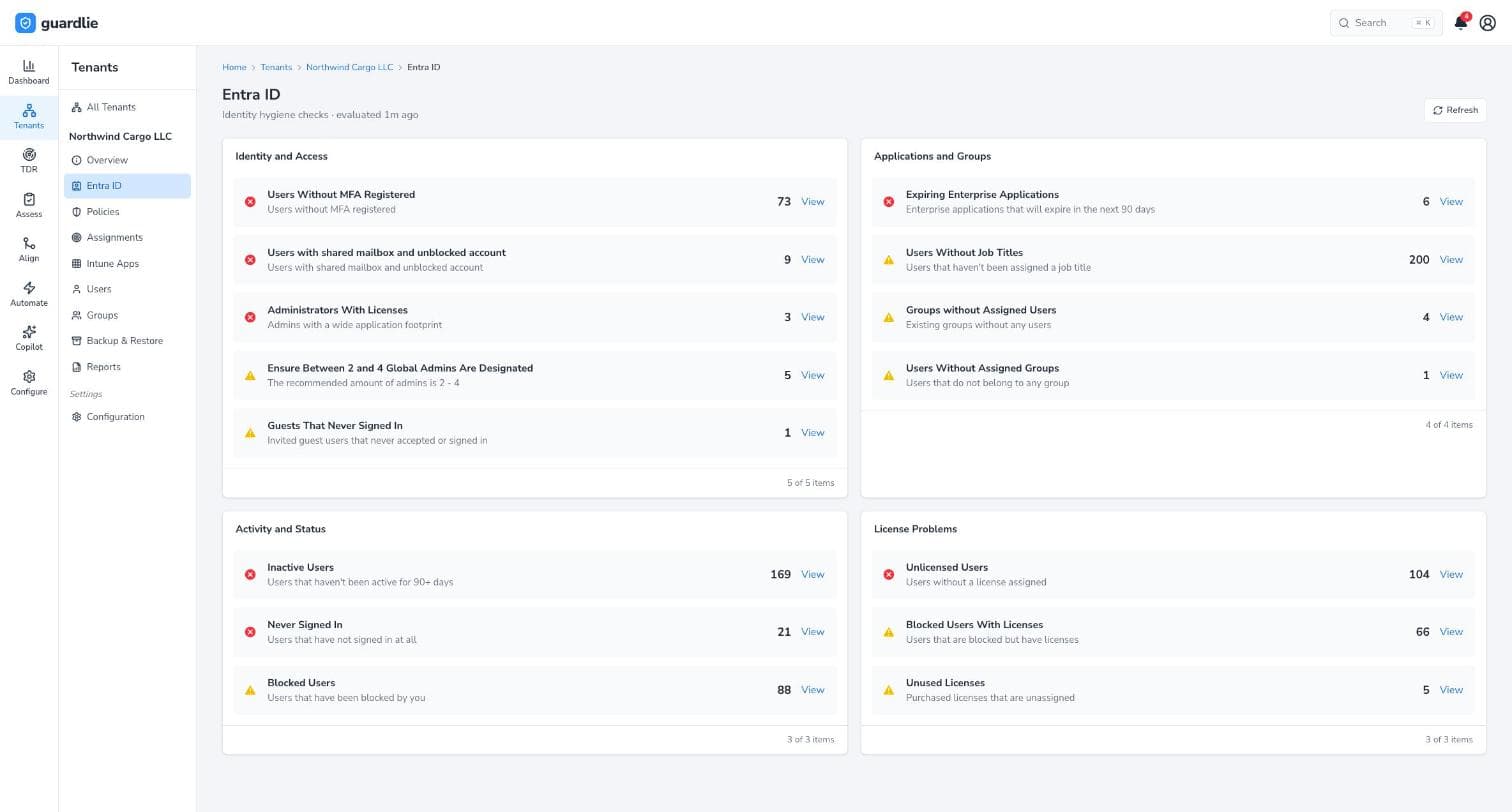
Every change is tested before it's enforced, and can be undone after
- 1
Scan
Sign in with your Microsoft admin account and approve access on Microsoft's consent screen. In a few minutes you get a security score, every finding in plain English, and a PDF you can forward.
- 2
Test
Pick a recommendation and Guardlie shows who it would affect. Sign-in policies run in report-only mode first, so you see what would have been blocked before anyone is.
- 3
Apply
Turn it on with one click once the test looks right. Guardlie saves the previous version first, so undo is always one click away.
- 4
Keep it fixed
Every policy is backed up nightly. If someone changes a setting in the Microsoft portals, Guardlie tells you and can put it back.
The free tools tell you what's wrong. Guardlie fixes it.
Microsoft Secure Score and open-source assessment scripts are a good start, and Guardlie uses the same benchmarks. They stop at the part that worries most admins: changing a setting every sign-in in the company depends on.
| Capability | Free tools | Guardlie |
|---|---|---|
| Lists what's misconfigured | ||
| Explains each finding in plain English, with who it affects | Partly | |
| Applies the recommended setting for you | Manual | |
| Test run before enforcing | ||
| One-click undo | ||
| Nightly backup of every policy | ||
| Alerts when a setting is changed later | ||
| Report for insurers and auditors | Export only |
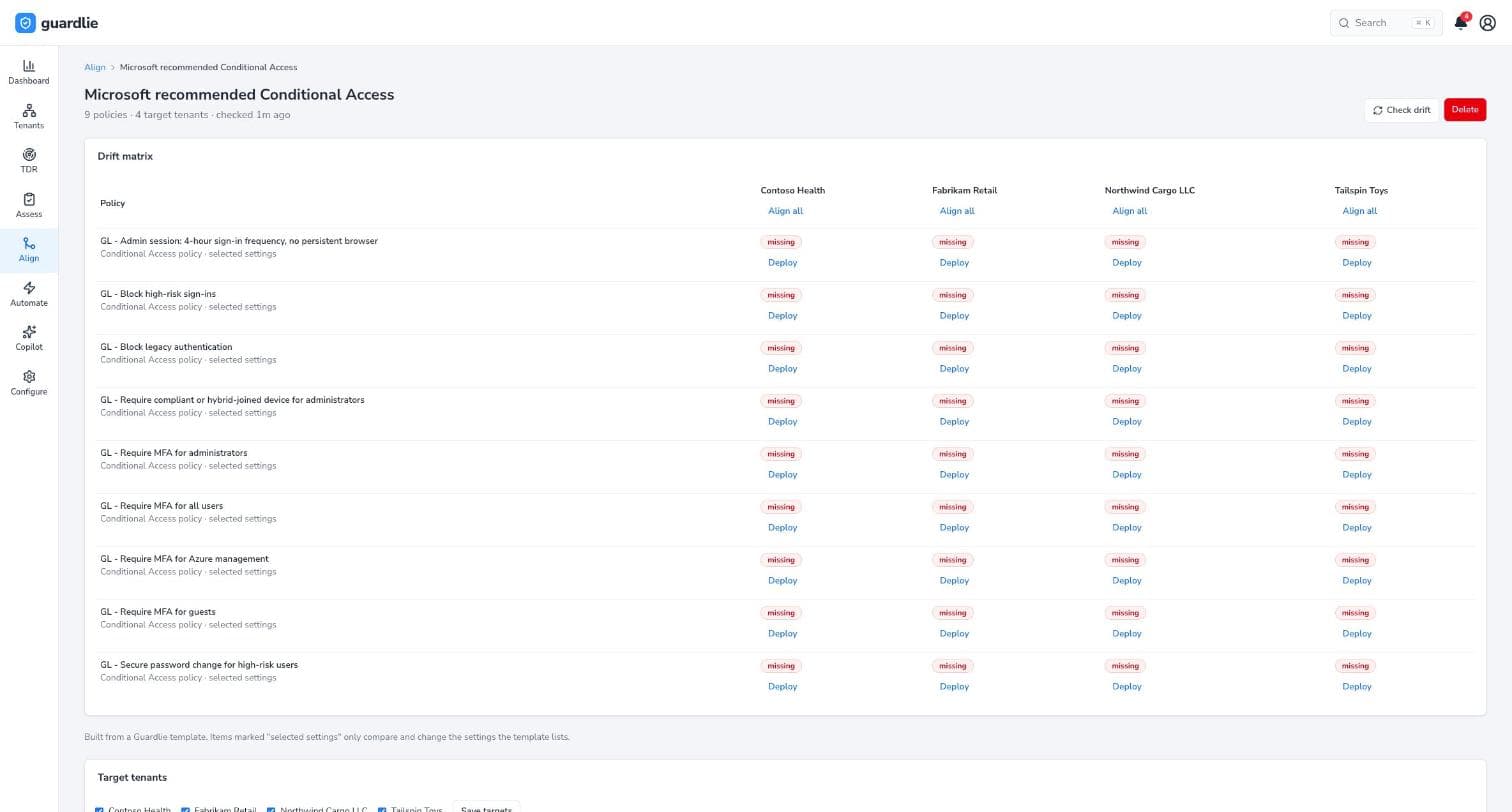
Ready when the questionnaire arrives
Cyber insurance renewals and audits ask the same things: is MFA enforced, are old sign-in methods blocked, is configuration backed up, who are your admins. Guardlie's PDF report answers them with evidence from your tenant, and can arrive in your inbox every month.
Teams usually start when they're
- Renewing cyber insurance
- Preparing for an audit such as SOC 2, ISO 27001 or Cyber Essentials
- Cleaning up after a phishing incident
- Taking over a tenant someone else set up
You stay in control of your tenant
- Nothing changes until you decide
- Guardlie only reads until an admin clicks Apply on a specific setting. Every change is logged with who made it, and Microsoft shows you every permission before you approve.
- Nothing changes by surprise
- Changes happen only when you click apply, restore or undo, and each one is recorded with who made it and when.
- Test mode for sign-in policies
- Conditional Access changes start in report-only mode, so you see real sign-in impact before anything is enforced.
- Your data stays yours
- Guardlie reads configuration and directory data, never email, files or chats. It's stored encrypted in AWS (US). Remove one enterprise app in Entra ID to revoke access.
One flat price for your organization
No per-user maths to get approved. Start with the free scan and upgrade when you want to fix what it finds.
Free scan
See how your Microsoft 365 or Google Workspace measures up. Nothing gets changed.
$0forever
Flat price for your organization. Up to 1,000 users, 1 connection.
Pro
Most teams start hereFix what the scan finds, safely, and keep it fixed.
$199per month
Flat price for your organization. Up to 1,000 users, 1 connection.
Starts with the free scan. Upgrade when you're ready to fix things.
Business
For larger or regulated organizations, and IT teams with more than one admin.
$499per month
Flat price for your organization. Up to 5,000 users, 3 connections.
Starts with the free scan. Upgrade when you're ready to fix things.
More than 5,000 users, or an MSP managing clients' tenants? Talk to us
See your score before your next renewal
Free, changes nothing, about ten minutes. Questions? [email protected]